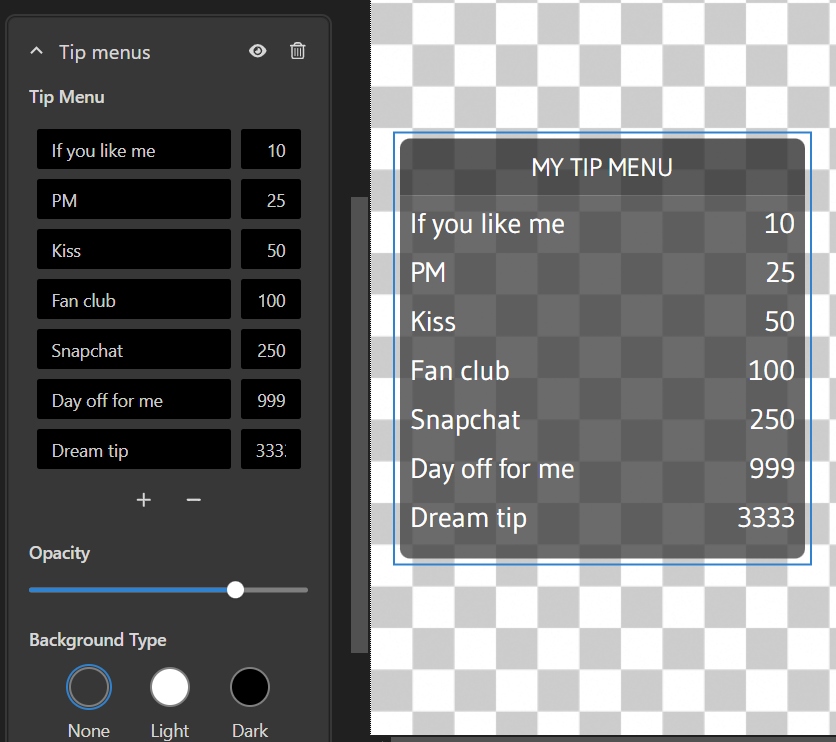
My Tip Menu
If you like me10
PM25
Kiss50
Fan club100
Snapchat200
Day off for me999
Dream tip3333
Thank you, lucky_fannightowlmr_bluek.dreamstipper88sweet_toothvip_jack
Interact with your audience and motivate your viewers tipping more
Compatible with all popular streaming software and interactive toy brands. Free to use.










Just 4 easy steps to start
MyTipMenu is FREE to use without any limitations. Moreover, it's also free from ads. Being a part of the Streamster Overlays tool, it is available for all Streamster user with the Free plan.
Static MyTipMenu is available for any cam site that allows using external encoder (OBS) for livestreaming. An Interactive Tip menu, that reacts on tips, is available on Chaturbate, Stripchat, MyFreeCams and Cam4. We are currently working on expanding this list.
MyTipMenu is compatible with any streaming software that allows using the web page as a video source. It is integrated with Streamster desktop app, but can be also used with OBS Studio, SplitCam, etc.
Classic tip menu displays the table of rewards and prices for these rewards. It can be static, just displaying the tip menu on the stream as an overlay, or interactive, reacting to the tips. The interactive tip menu highlights one of the rewards once the specific tip is received.
In Random tip menu, all rewards have the same price, and one of them is selected randomly once the specific tip is received. Thus, random tip menu works in the interactive mode, and can be used on specific streaming platforms only.
Basically, your tip menu may contain any options, including interactive toy reactions. However, the current version of MyTipMenu is not integrated with toys, thus, it can't make the toy react.



Operating a studio and looking for a Tip menu tool for your models? Try Streamster Business Studio to manage multiple accounts.
 Social media badges
 Monetization platforms badges
 Wish lists badges
 Custom texts
 Custom images
 Copyright protection badges
 QR-codes
 Stickers
 Tip2Peep